Work in progress Fledgetone is still being built, so things may change or break.

For scoring video

Score your video, frame by frame.

Load your cut and write to it: Fledgetone finds the cuts, fits the tempo so they land on the beat, keeps everything in timecode, and hands the music and its markers back to your editor.

Fledgetone doesn’t edit video. Cut your film in your own editor, bring it here to score it, then take the music and markers back.

Free, in your browser or as an app. No account, and nothing is generated by AI: you write the music.

The film is AI-generated. The studio and the music are Fledgetone.

Scored in Fledgetone

First Flight

A hesitant flute on the nest, a hit and driving cellos on the leap, horns and choir as it soars, and a D major chord as it lands, at 117.76 BPM so every cut falls on a bar. Under it, from the sound effects maker: birdsong, wingbeats, wind over the valley and crickets at dusk.

Download the project

Film: AI-generated. Music and sound effects: made in Fledgetone.

ScoringWrite to the picture

Hit points

Every cut on the beat

Load an MP4 or WebM and it runs along the timeline with a preview window that follows the playhead. Find the cuts marks every hard cut with a hit point locked to its time.

FIT › Hit points then finds the tempos that land the music on those hits, from a bar down to a beat, and shows how close each one gets. For a cut no tempo can catch, add a tempo change or a time signature change right there.

  • Hit points stay on their frame when the tempo changes
  • Tempo changes, glides and time signatures
  • The tempo finder and tap tempo, from the picture
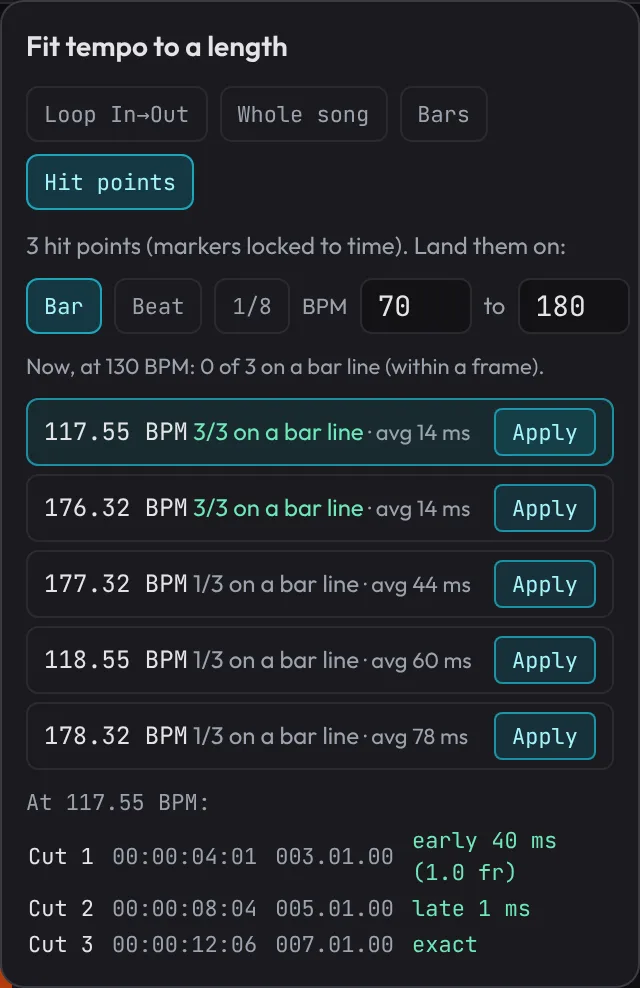
Fit tempo to a length, set to Hit points: tempos that land all three cuts on a bar line, each with how far off it is, and the cuts with their timecodes.

Timecode

Timecode you can trust

Work in your project's frame rate: 23.976, 24, 25, 29.97, 29.97 drop-frame, 30 or 60 fps. Type a timecode to go there, switch the ruler to time, and snap clips, cuts and markers to frames.

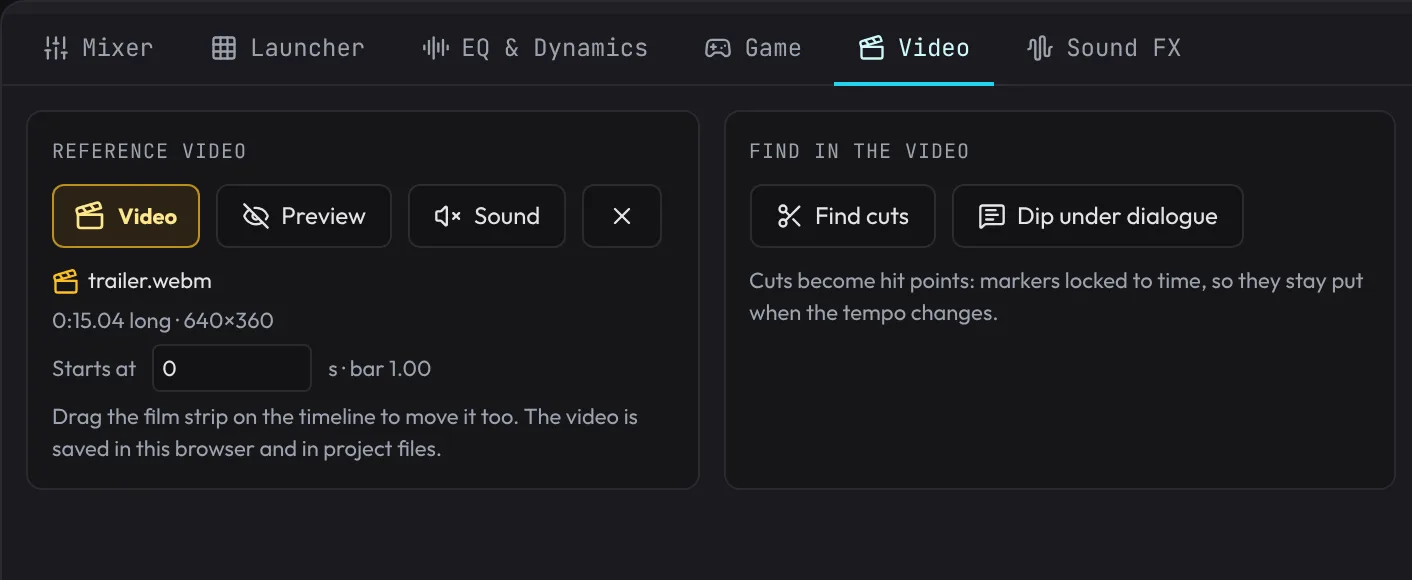
The Video tab keeps it all together: the film, its sound, where it starts, the cuts, dialogue dips, the tempo finder, cut to length and the exports.

  • Drop-frame counted the way your editor counts it
  • Snap to frames, not just beats
  • The video is saved with the project
The Video tab: the reference video with its preview and sound, where it starts, finding cuts, dipping under dialogue, hit points and tempo, cut to length, and exports.

Hand-off

Back to your editor

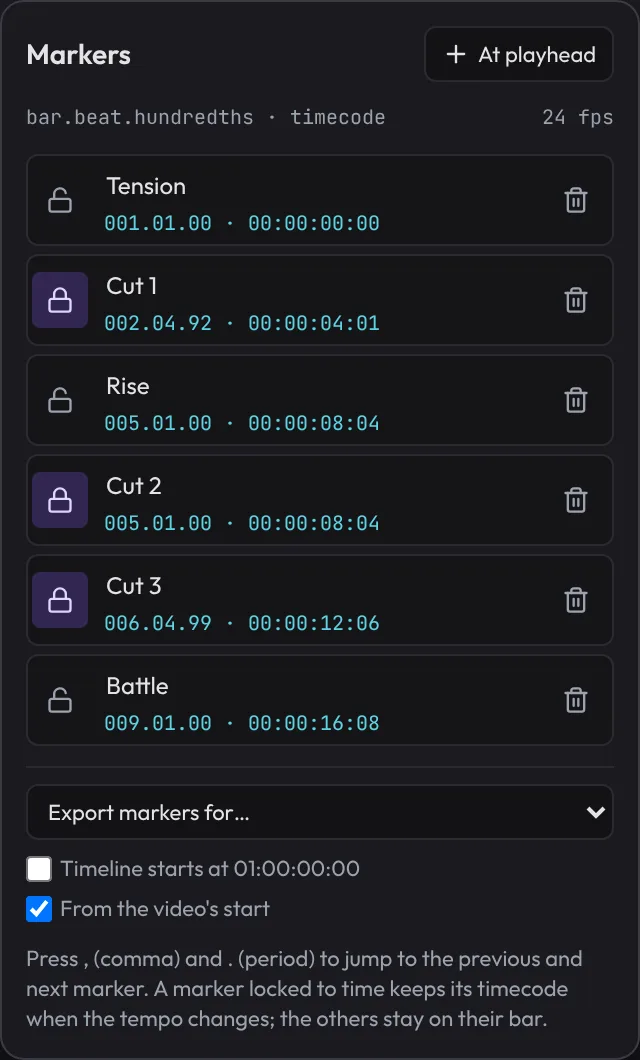
Export markers for video editors sends your cues to Premiere Pro, DaVinci Resolve or Final Cut Pro, starting at 01:00:00:00 if your timeline does. Export the mix, stems for every track at 48 kHz, or the music straight onto your MP4.

  • Markers with their timecodes
  • Stems that add up to the mix
  • The music on your video, its own sound kept if you like
The Markers list with each marker’s bar and timecode, cuts locked to time, and Export markers for a video editor with a 01:00:00:00 start.

ToolsFor dialogue, deadlines and every cut-down

Dip under dialogue

It listens to the film's own sound for voices and dips the music for every line, bridging the pauses between words. Each dip is ordinary volume automation you can move.

One score, every length

Cut to length makes 6, 15, 30, 60 and 90-second versions for trailers and spots, every edit on a bar, ending on the score's own ending.

An underscore version

Export the cue with a version that leaves out the lead melody, and one without drums, for scenes with voice-over.

A recorded orchestra

Strings, brass, woodwinds, harp, timpani and a twenty-voice choir, recorded at several loudnesses, with swells, vibrato and legato you can draw.

Real rooms

Put the whole score in a recorded hall, or give each section its place on the stage, so the orchestra sounds like it was in one room.

Sound design

Hits, risers, whooshes and ambience from the sound effects maker, on tracks next to the music, placed to the frame.

Make the score your video deserves.

Free, in your browser or as an app.

Free, open source and private: no account, and your songs stay on your computer. Works best on a computer with a keyboard and mouse. Back to the home page