
Learn Lesson 4
Bass lines and 808s
The bass ties the drums to the harmony: it plays the chords' lowest notes, in the drums' rhythm. In this lesson you'll set up four chords and a rap beat, write a bass line that follows the chords' roots, then swap it for an 808: a long, booming sub bass that slides between notes. You'll tune it to the key and make it dip under every kick, so the kick and the bass stop fighting. Open the studio in another tab and follow along.
This lesson builds on Make your first beat and Chords and a melody. If you've done them, you know the piano roll; if not, you'll still be fine.
Set up chords and a beat
- File › New… › Blank timeline.
- Click the tempo, 122, in the header, type 140 and press Enter. 808s live in modern rap beats, which sit around 140 BPM.
- Right-click the Drums lane at bar 1 and choose Drummer…. Set Style to Rap beat, Length to 4 bars and A fill every to no fills, then click Make clip at bar 1.
- Right-click the Space Clav lane at bar 1 and choose Chord progression…. Set Key to A minor, Progression to i – VI – III – VII (epic), Each chord lasts to 1 bar and Times through to 1× (4 bars), then click Make clip at bar 1.
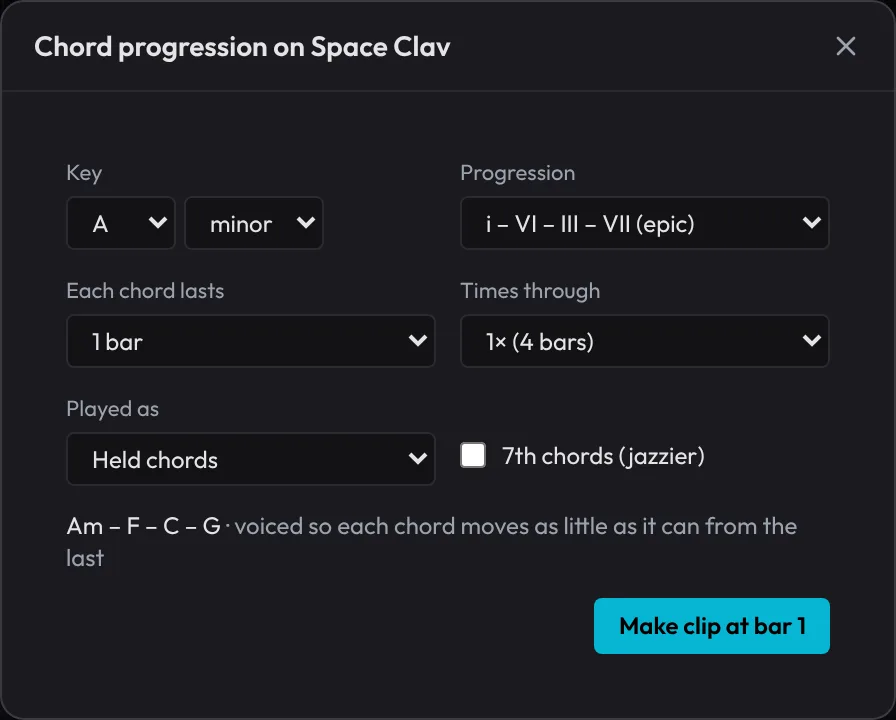
Press Space. You have four bars looping: Am, F, C and G, one a bar, over a half-time beat. Every chord is named after its root, the note it's built on: A, F, C and G. That's what the bass plays.
Follow the roots
- Right-click the Slap Bass lane at bar 1 and choose New empty clip (4 bars). It opens in the piano roll.
- Set SCALE to A and Minor. Notes outside the key are shaded dark and every A is lit, so you can find your way.
- Leave NEW NOTE at 1/8.
- Write this rhythm in every bar, on that bar's root:
| 1 | 2 | 3 | 4 | |||||||||||||
|---|---|---|---|---|---|---|---|---|---|---|---|---|---|---|---|---|
| Root |
| Bar | Chord | Root | Where it is |
|---|---|---|---|
| 1 | Am | A1 | the lit row, three rows under C2 |
| 2 | F | F1 | four rows under A1 |
| 3 | C | C2 | the row marked C2 |
| 4 | G | G1 | two rows under A1 |
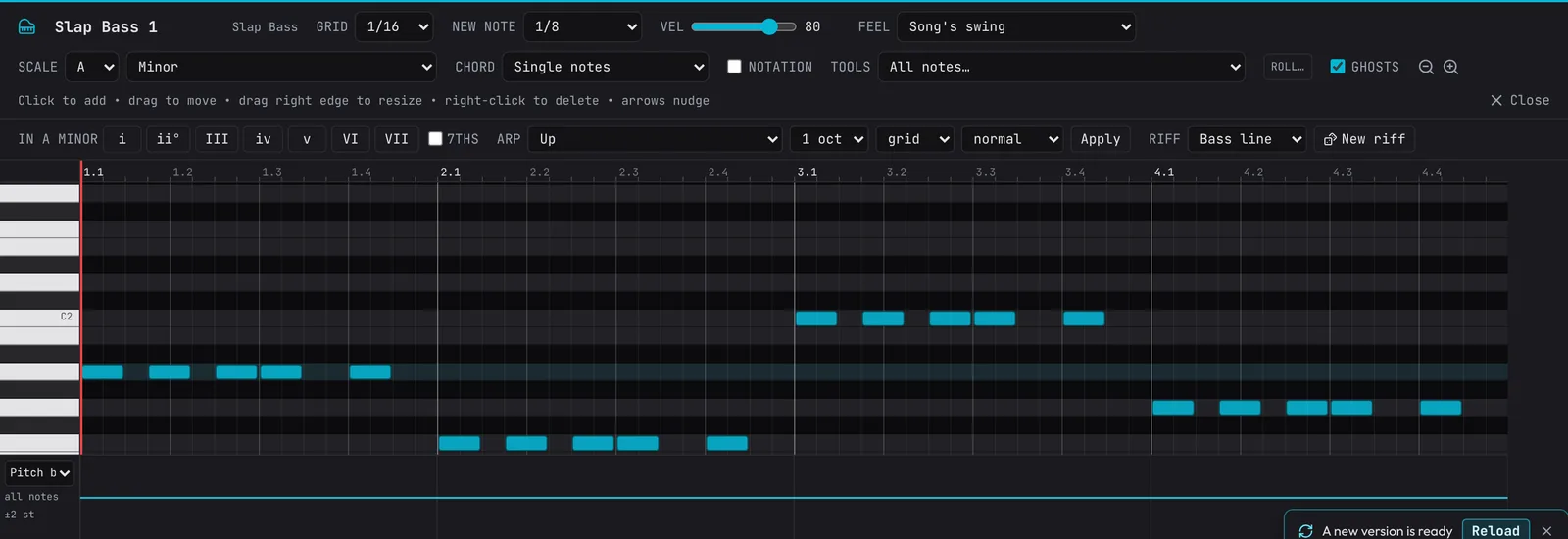
Play it. The bass locks the chords to the beat: the three hits at the start of each bar push forward, then beats 3 and 4 settle. The note that changes on each bar line is what makes the harmony move.
Let the app write one. Right-click the chord clip on the Space Clav and choose Bass line from these chords: an 8th-note bass on each root, on a new Bass line track. Accompaniment for these chords… in the same menu has a Walking bass (quarter notes up the chord, a half step into the next) and more. Each is one Undo step and ordinary notes to change.
Add an 808
An 808 is a sine wave with a punchy start and a long tail: one note fills the low end for a whole beat or more. Two basses playing the same part muddy each other, so first click M on the Slap Bass header to mute it (and the Bass line track, if you made one).
- Click + Add Track under the tracks, type 808 and press Enter. An 808 Bass track appears, and the Track Inspector opens on the right.
- Right-click the 808 Bass lane at bar 1 and choose New empty clip (4 bars).
- Set SCALE to A and Minor again, and NEW NOTE to 1/2 (half a bar).
- Click in these eight notes. Each one is half a bar long, so they butt up end to end:
| Bar | Beat 1 | Beat 3 |
|---|---|---|
| 1 | A1 | A1 |
| 2 | F1 | F1 |
| 3 | C2 | C2 |
| 4 | G1 | see below |
Play it. Two notes that only touch, one ending where the next starts, hit twice. That's what you want on beat 3: a new hit, a new boom.
Make it slide
The sound everyone knows from an 808 is the slide: the pitch bending from one note to the next. The 808 slides when a note starts before the one sounding has ended.
- In bar 4, click a G2 (an octave above G1, the row seven above C2) starting halfway between beats 2 and 3.
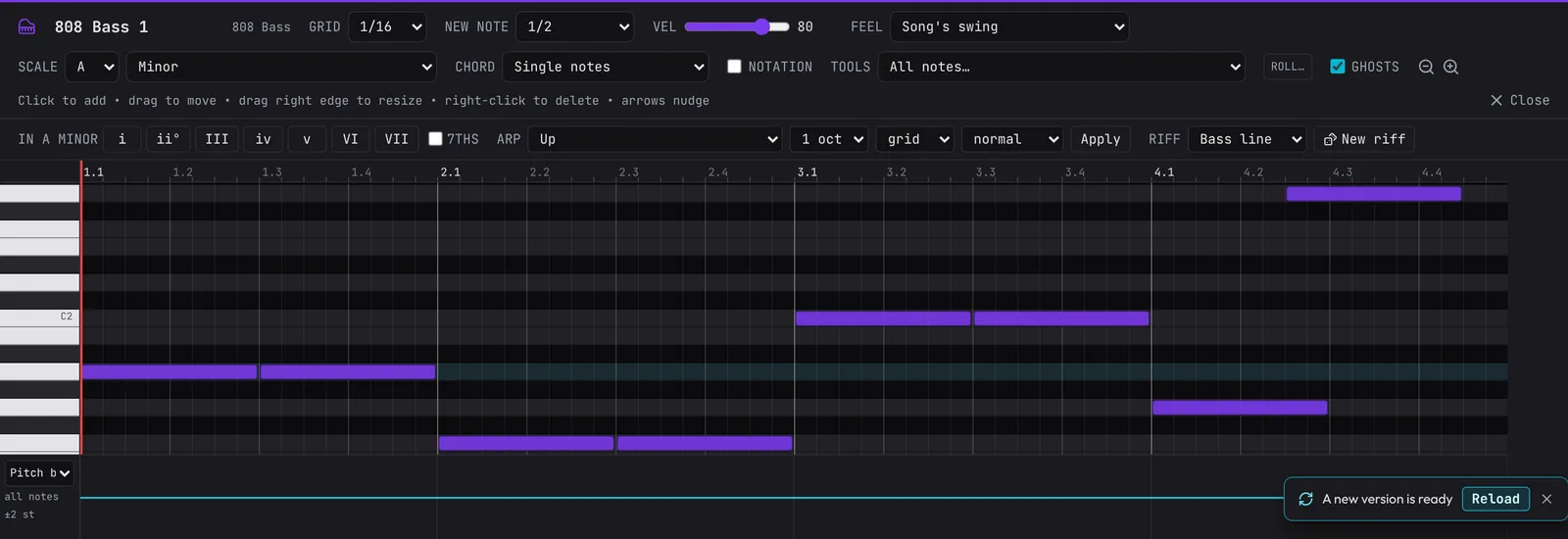
G1 is still ringing when G2 starts, so instead of hitting again the 808 swoops up an octave and carries on to G2's end. Play it: that swoop pulls you back round to bar 1.
Shape and tune the 808
Select the 808 Bass track (click its header) and look at the Track Inspector. Under the instrument is the 808 designer (every control is in the guide).
- Click its OFF switch to turn it ON.
- Open Load preset… and choose Long slide: a long tail, slower and wider slides, a little drive.
- Try Glide: how long a slide takes. Long slide sets 160 ms; drag it towards 300 ms and the swoop gets lazier.
- Try Decay: how long a held note rings (Long slide sets 3.20 s). Short decays suit busy patterns, long ones sparse ones.
- Tick Tune to key, then set the key beside it to A and the scale to Minor.
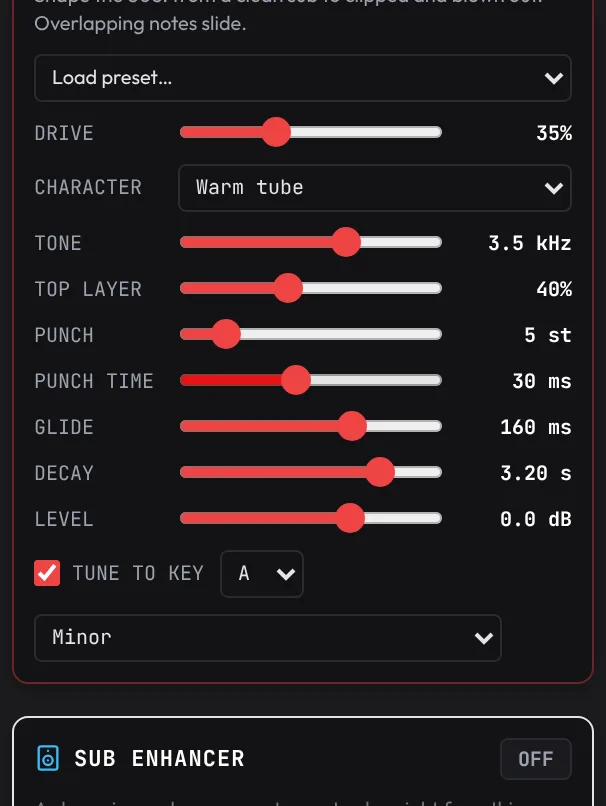
Tune to key snaps every note the 808 plays to the nearest note of the key, so a stray click can't clash with the chords. Your notes in the clip don't change, only what you hear. It starts on the key it hears in your other parts, which here may read C Major: the same notes as A minor, so either works.
The other knobs: Drive and Character add grit, Tone darkens it, Top layer adds harmonics so the 808 is heard on phone and laptop speakers, and Punch is the knock at the start of each note. The presets are good starting points: Punchy, Distorted and Blown-out for harder styles, Clean deep for a pure sub.
Let the kick through
A kick and an 808 both live in the lowest octave. When they hit together, the 808's boom hides the kick's punch. The fix every producer uses is sidechain ducking: the bass dips for a moment at each kick, then swells back.
Scroll down the 808's Inspector to Kick and bass. It counts how many of the song's kicks land on a low note of this track.
- Click Duck under the kick.
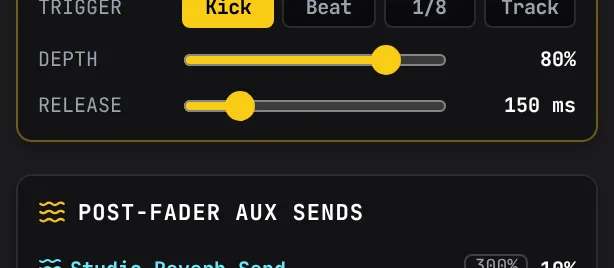
That switches on the track's Pump, set to follow the kick: TRIGGER Kick, DEPTH 80%, RELEASE 150 ms. Play the loop and listen to the kick: it cuts through now, and the 808 still fills the space between. Any track has a Pump in its Inspector (see the Track Inspector), so you can do the same by hand: lower DEPTH for a gentler dip, or a longer RELEASE for the slow breathing pump of house and EDM.
More bass tools
The bass tracks share a few more tools in the Inspector (see Heavy bass tools):
- Glide (Slap Bass, Sub-Bass and the Wobble, Growl and Reese basses): switch it on and overlapping notes slide over Time, like the 808. Unmute your Slap Bass, switch Glide on and overlap two notes to try it.
- Sub enhancer: a clean sine under every note, an octave below or on the note, for a bass that sounds thin.
- Bass Drive: distorts the mids and highs only, keeping the sub clean and centred. Your bass gets louder on small speakers without getting muddy.
What's next
You've followed the chords' roots, written an 808 that slides, tuned it to the key and made it duck under the kick. Next, turn your loops into a whole song with an intro, verses, a drop and an ending: Arrange a full song.
Open the example in the studioThe finished low end: a rap beat, Am – F – C – G, the root line muted on the Slap Bass and the 808 sliding, tuned and ducked.