Learn Lesson 2
Make your first beat
Every song needs a pulse. In this lesson you'll start from an empty timeline and click in a one-bar drum pattern, step by step, like a drum machine. Then you'll loop it, give it swing, try a house beat and a rap beat with a hi-hat roll, add a fill, and see the shortcut that writes a whole drum part in one go. Open the studio in another tab and follow along.
Start with a blank timeline
- Open the File menu and choose New….
- Click Blank timeline at the top.
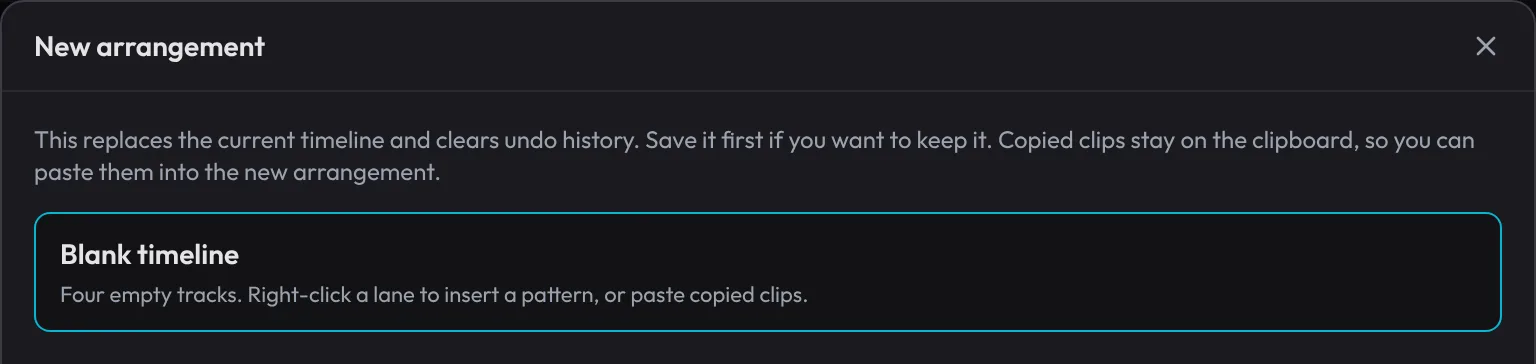
You get four empty tracks: Drums, Slap Bass, Space Clav and Brass Stabs, at 122 BPM. The amber strip on the ruler, from bar 1 to bar 5, is the loop: playback goes round it until you stop.
Make a drum clip
- Double-click the Drums lane right at the start of bar 1, just right of the red playhead. A one-bar clip called Drums 1 appears, and opens in the piano roll under the timeline.
- Look at the piano roll. A drum kit has a row per drum: Kick at the bottom, then Snare, Clap, Closed Hat, Open Hat, the toms, Cowbell, Ride and Crash.
- Check that STEPS is ticked (it is for drum kits) and GRID reads 1/16. The bar is now 16 steps, four to a beat.
Double-click a little later in the bar and the clip starts on that beat instead. If that happens, press Ctrl+Z and try again nearer the start.
Write a backbeat
The backbeat is the beat under most rock and pop: kick on beats 1 and 3, snare on 2 and 4, hi-hats ticking along in 8ths. Each column below is one step of the bar; the numbers are the beats.
| 1 | 2 | 3 | 4 | |||||||||||||
|---|---|---|---|---|---|---|---|---|---|---|---|---|---|---|---|---|
| Kick | ||||||||||||||||
| Snare | ||||||||||||||||
| Closed Hat |
- Click step 1 and step 9 on the Kick row.
- Click step 5 and step 13 on the Snare row.
- On the Closed Hat row, click every other step: 3, 7, 11 and 15. Then Shift-click steps 1, 5, 9 and 13. Shift-click adds an accent, a hit at full strength, so the hats lean on the beat (the bold X steps above).
- Press Space to play.
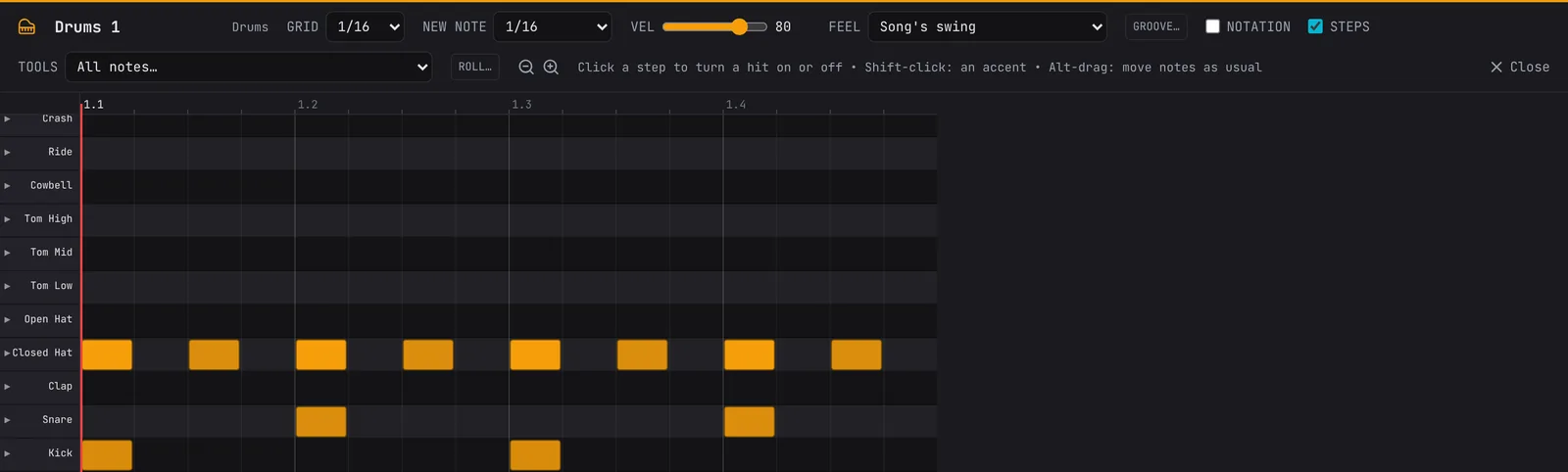
A click on a hit takes it out again, so mistakes cost nothing. You'll hear your bar once, then three empty bars while the loop goes round to bar 5. Fix that now:
- Drag the OUT bracket at the right end of the amber loop back to bar 2. Now the loop is just your bar, and it plays round and round.
Give it swing
Straight 8th notes sound stiff to some ears. Swing pushes every second note a little late, for a shuffle.
- In the piano roll's header, open FEEL (it says Song's swing) and choose Swing 8ths: shuffle. The hats now lope instead of tick.
- Try Swing 8ths: light and Straight too, and keep the one you like.
FEEL is this clip's own swing. The SWING slider in the header (20% in a new project) swings the whole song, but only the off-beat 16ths, so it doesn't change 8th-note hats at all: you'll hear it on the house beat below. GROOVE… beside FEEL goes further, with a swing for each drum (see the piano roll and Tempo, swing and listening volume).
Try a house beat
Same bar, another style. In the piano roll, press Ctrl+A to select every hit and Delete to clear them (Ctrl+Z brings your backbeat back whenever you want it). Click the tempo, 122, in the header, type 124 and press Enter. Then click this in:
| 1 | 2 | 3 | 4 | |||||||||||||
|---|---|---|---|---|---|---|---|---|---|---|---|---|---|---|---|---|
| Kick | ||||||||||||||||
| Clap | ||||||||||||||||
| Closed Hat | ||||||||||||||||
| Open Hat |
The kick on every beat is the four on the floor. The open hat lands on each "and", between the kicks, and the closed hats fill the 16ths around it. Now the header's SWING does something: drag it up to 35% and the 16th hats start to roll.
Try a rap beat with a hi-hat roll
A modern rap beat runs fast, around 140 BPM, but the snare only lands once a bar, on beat 3, so it feels half as fast. Clear the bar again, set the tempo to 140, and click in:
| 1 | 2 | 3 | 4 | |||||||||||||
|---|---|---|---|---|---|---|---|---|---|---|---|---|---|---|---|---|
| Kick | ||||||||||||||||
| Snare | ||||||||||||||||
| Closed Hat |
The empty last beat of the hats is for a roll: fast hits that rush into the next bar.
- Set NEW NOTE to 1/4.
- Hold Alt (Option on a Mac) and click the start of beat 4 on the Closed Hat row. Alt-click adds a note of the NEW NOTE length, so you get one hat a beat long.
- Alt-click that hat again to select it.
- Click ROLL…, set RATE to 1/32, leave VELOCITY on Rising, and click MAKE THE ROLL.
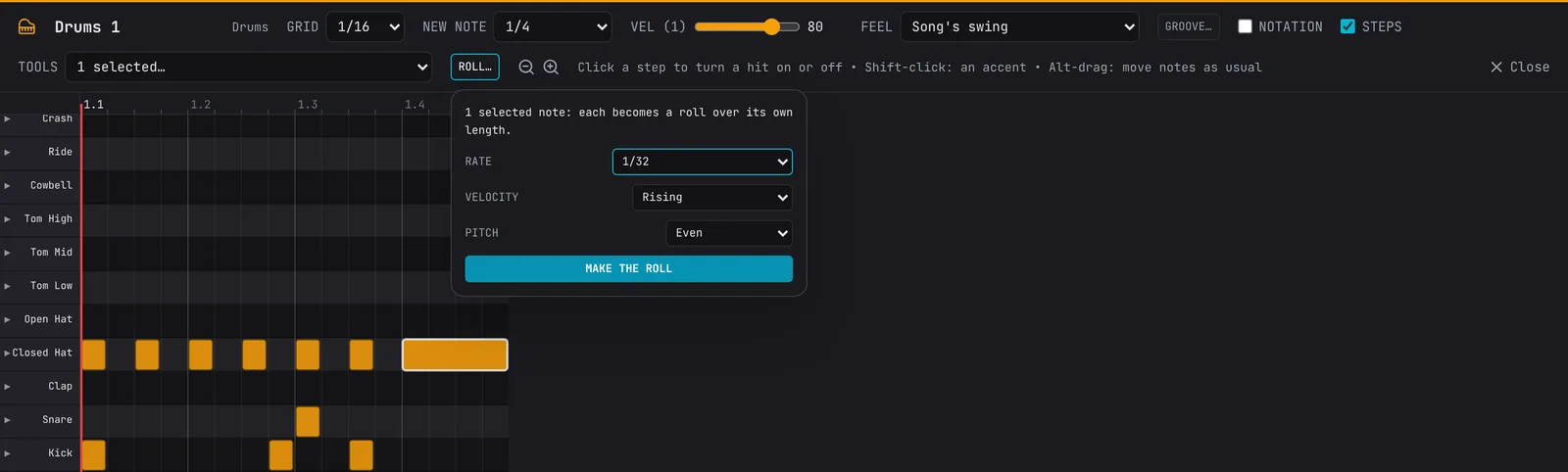
The long hat becomes eight quick hits getting louder. Try 1/16 triplet for a rolling triplet, or PITCH: Rising +5 st for hats that climb as they roll. Swing leaves a roll even, so it never stumbles.
Repeat it
Pick the beat you like best (undo back to it if you need to). Now make it last.
- Press Esc to close the piano roll (press it twice if notes are selected).
- Drag the OUT bracket back to bar 5, so the loop covers four bars.
- Right-click your clip and choose Fill to loop Out. The menu says bar 5: that's where the copies stop.

Your bar now repeats four times. The copies are ordinary clips, so you can open any one and change a hit or two, which keeps a long beat from sounding like a machine. Get the first bar right before you fill, though: it's the one that gets copied. For a set number of copies, right-click and choose Repeat ×N… instead.
Add a fill
A fill marks the end of a phrase, so the listener hears the next one coming.
- Right-click the clip in bar 4.
- Choose Fill: snare roll (last beat).
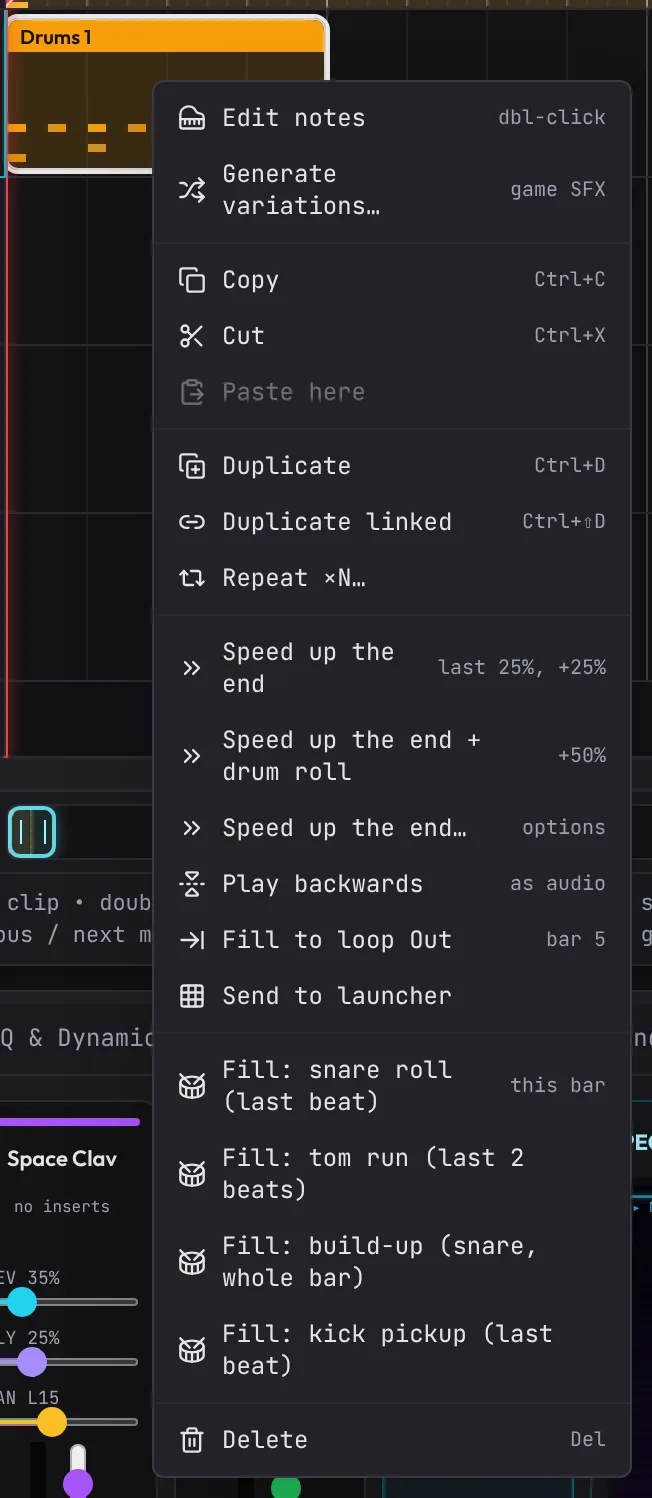
The last beat of that bar becomes a snare roll. The other fills are tom run (the last two beats), build-up (the whole bar, snare 8ths to 16ths to 32nds, getting louder) and kick pickup. The fill goes in the bar under the pointer, so right-click the bar you mean. Each is one Undo step, and the result is ordinary hits you can change.
The Drummer: a whole part at once
You've built a beat by hand, which is the best way to learn what each drum does. When you want a part fast, the Drummer writes one from a style's rules.
- Right-click an empty spot on the Drums lane, at bar 5 say, and choose Drummer….
- Pick a Style: Backbeat, Four on the floor, Rap beat, Boom bap and 17 more. Each one shows the tempo it usually sits at.
- Choose a Length (1 to 16 bars), A fill every 2, 4 or 8 bars (or no fills), and drag Energy from sparse to busy.
- Click Make clip at bar 5 (the button names the bar you right-clicked).
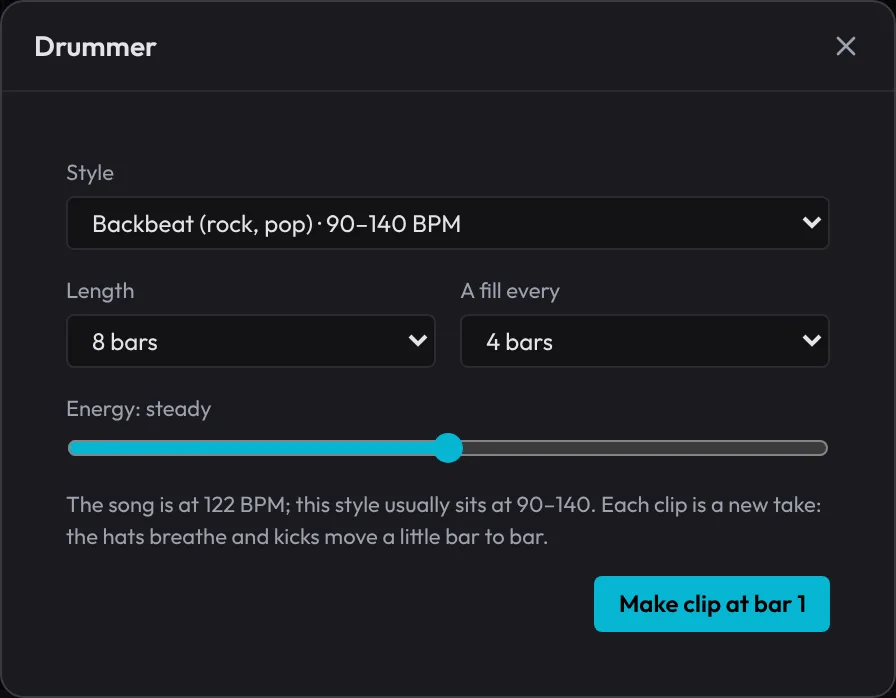
The clip opens with a crash, and the hats and kicks change a little from bar to bar, like a drummer playing rather than a loop repeating. It's ordinary notes, so open it and change anything. To hear it, drag the loop over it (or press L to turn the loop off). More in Smart tools.
What's next
You've written a beat step by step, looped it, swung it, tried three styles, rolled a hat and added a fill. Next, give your beat something to play over: Chords and a melody. Later, Bass lines and 808s locks a bass to your kick.
Open the example in the studioThe finished beat: the backbeat with shuffled hats, four bars, and a snare-roll fill at the end.