Guide Game music
Game music
Fledgetone makes music for games that reacts to play: a song's sections become states the game switches between, its tracks layers it fades in and out, with stingers for moments, and exports that carry it all into a game engine. Any song with markers works: open a starter (File › New…) or your own song, and its sections are the states.
Game preview: hear it the way the game will play it
The Game tab of the bottom panel (the Game button at the top right opens it) is for rehearsing adaptive music, the kind that changes with what the player is doing:
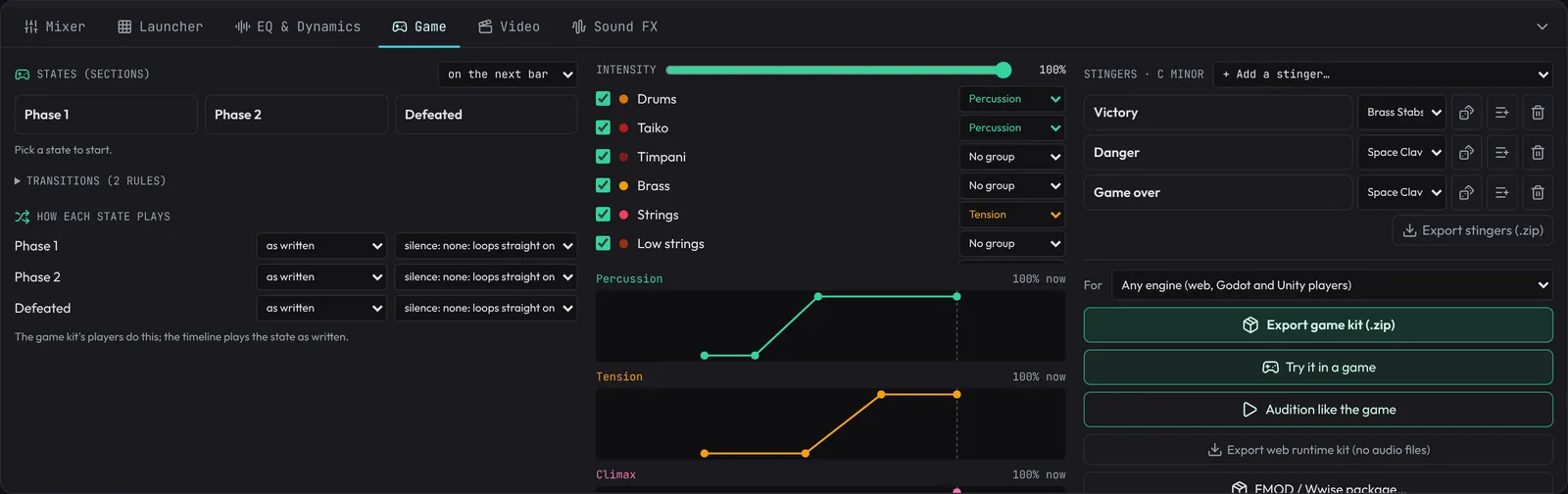
- States: every section between your markers is a button (Intro, Explore, Combat, Boss...). Click one and the song moves there on the next bar (or next beat, or at once: the menu above them) and loops it, the way a game switches music. The playing state is green; a waiting one pulses amber.
- Transitions (click to open, under the states): a matrix of how each state hands over to each other one. Rows are the state you come from (and Any, for a rule that applies from every state unless that row has its own); columns are the state you go to. Click a cell and pick:
- Cut (straight in), Fill (a snare fill over the beat before, on the song's own kit), Riser (over the bar before; the switch waits a bar if there isn't a whole one left), Impact (a hit on the new state's downbeat), Crossfade (the old state fades out as the new one fades in, over 1 to 16 beats), or Stinger (one of your stingers plays on the line, and the new state comes in after it: a 2-bar stinger bridges 2 bars), or Bridge (a bar or two written to lead into the new state, then the state).
- Bridge writes the lead-in from your song: it looks at what the new state opens on and plays the chord that pulls hardest into it (its dominant seventh: G7 into C), with the bass stepping up into the new root and the drums filling the last beat. 2 bars turns through the chord before that first (ii before a major chord, iv before a minor one). It plays on your song's own chord part, bass and drums, through its mix, in the new state's tempo and time signature. Change the song and the bridge follows.
- When: on the next bar (the default), on the next beat, on the next phrase (every 2, 4 or 8 bars counted from the state's start, so the music turns where a phrase does), at the end of the loop (when the state comes round, or its shuffled piece ends), or at once.
- A switch with no rule cuts on the next bar. Rules are saved with the project.
- Switching states on the timeline plays the cuts, fills, risers, impacts, stinger bridges and written bridges (on preview instruments), and waits for the phrase or the loop's end; a crossfade needs two parts of the song at once, so there it cuts. Audition like the game (below) plays every rule exactly.
- Intensity: the music a game turns up as things get exciting. Give each track a stem group with the list beside it: Ambient, Percussion, Tension, Climax or Other… (any name); Auto-assign puts drums in Percussion, effects in Tension, leads in Climax and everything else in Ambient. Each group in use gets a curve: how loud its tracks play (up) at each intensity (across). Drag a point to move it, click empty space to add one, double-click a point to remove it; the dashed line is the intensity now. Then scrub Intensity (here, or next to Swing in the header) while the song plays: the groups crossfade along their curves, smoothly, the way the game's audio code will mix them. Tracks without a group always play at full level, and the on/off switches still mute a track outright.
- The mixdown and video exports play at the Intensity you set; stems, layers and the game kit stay at full level, so the game can apply the curves itself (the curves go into the kit's files).
- Stem groups, the curves and the intensity are saved with the project. Changing a track's group is an Undo step; moving the slider and the curves isn't.
- When it sounds right, export the sections with Intro + loop and the layers with Layers (below) for your game engine.
Stingers (at the bottom of the panel) are short cues a game plays over its music when something happens. Choose one from + Add a stinger…: Victory (a fanfare), Level up (a rising arpeggio), Item found, Checkpoint, Danger (tense low pulses) or Game over (falling to a low minor chord). Each is written in the song's key, worked out from its notes and shown next to the heading, and plays at the song's tempo.
- Click a stinger to fire it over the music, the way the game will: on the next bar, the next beat or at once (the same choice as the states). It lights up when it plays.
- Pick its instrument from the list beside it. The dice makes another version (a different rhythm or register), written again in the song's current key, so after a key change or new chords it follows.
- The list button puts it on the timeline at the playhead, on a new track, as an ordinary clip you can edit in the piano roll.
- Export stingers (.zip) renders each one as a WAV through the song's master section, ringing out, ready for the game.
- Stingers are saved with the project. Adding, changing or deleting one isn't an Undo step (putting one on the timeline is).
Loop variations (under the stingers) export 2, 3 or 4 takes of the loop region, so a player who stays in one place doesn't hear the very same loop over and over: the game picks a different take each time round. A is the loop as written; B ends with a snare fill into the loop point, C with a tom fill, and D drops the hats for the first half with a kick pickup at the end (the fills go on the first drum track that plays through the loop's last beat). With Human feel ticked, tracks without the Human insert get a light one, so every take's timing and dynamics differ too. Export saves a .zip of seamless WAV loops (with loop points), all exactly the loop's length and at one level, so the game can switch takes at the loop point without a jump.
Audition like the game
Audition like the game (in the Game tab) renders the states, their stems, the stingers and the transition sounds exactly as the game kit exports them (it takes a few seconds, more for a long song), then plays them with the kit's own web player. Big pads switch states (a waiting one pulses until its line), stinger pads fire stingers on the next beat, and Intensity crossfades the stem groups. Every switch follows your transition matrix, crossfades included, so what you hear is what the game will do. The song stops while it's open.
Costumes: the same music played another way
Costumes (in the Game tab) are the song played another way: each track on another instrument, or silent, and maybe faster or slower. The game swaps costumes mid-loop and the tune carries on in its new clothes: the 8-bit version in a retro room, a music box in a dream, the night version after dark, a hurry-up when time runs low.
- Pick a preset and Add costume: 8-bit (every part on the chip sounds), Music box (the tune and chords on a music box, no drums), Solo piano, Night (no drums, brass on soft strings, 10% slower), Hurry up (20% faster, same pitch) or Your own (nothing changed yet).
- Open a costume to rename it (its name is what the game asks for), set its tempo, or pick each track's instrument: as it is, silent, or any other (drum parts can only go to another kit). Notes are moved into the new instrument's range.
- Hear them in Audition like the game (the Costume buttons). The game kit renders every state in every costume, lined up so a player can swap at any moment.
How each state plays: shuffled pieces and silences
Under the states, How each state plays sets, for each state:
- Order: as written (a loop), or shuffle 2-, 4- or 8-bar pieces: the game plays the state's pieces in a random order, never the same piece twice running, so a long stay never sounds quite the same.
- Silence: none, or a silence between plays (4 to 12 s, 15 to 45 s, 1 to 3 min), a different length each time: music that comes and goes, so it still means something when it comes back.
The timeline plays a state as written; the game kit's players (and Audition like the game) do the shuffling and the silences.
Effects in the game
The game kit's players can shape the music for what's going on, with no extra files: underwater (a low-pass and a big room), muffled (behind a wall, the pause menu), low health (duller, further away), dream (soft, washed in reverb) and none, gliding over a second or so. Try them in Audition like the game (the Effect buttons). In code it's setEffect("underwater") (web), set_effect("underwater") (Godot) or SetEffect("underwater") (Unity); setFilter and setReverb set the low-pass and the reverb directly. Sound effects aren't touched.
Parameters: one number from the game, several changes in the music
A parameter is a number the game sets, 0 to 1, that moves several things in the music at once: danger raising the intensity as enemies close in, health muffling the music as it runs out, depth under water. The game doesn't need to know how the music is mixed; it just calls setParameter("danger", 0.7) (web), set_parameter("danger", 0.7) (Godot) or SetParameter("danger", 0.7f) (Unity). It's how games drive their music in FMOD and Wwise.
In the Game tab, Parameters adds one from a preset (or your own, empty):
- danger: the intensity rises from 15% to full, and the music opens up from a slightly dull 7 kHz over the first half.
- health (starts at 100%): below half, the music muffles (down to 1.2 kHz) and dips to 75%.
- depth: deeper is more muffled (down to 600 Hz) and roomier.
- distance: far from where the music plays (a radio, a stage), quieter, duller and roomier.
- tension: your stem groups come in one after another as it rises (each over its own stretch).
Each thing a parameter moves is a line you can change: what it moves (Intensity, Filter in Hz, Reverb, Volume, or one stem group's Layer level), what it goes from and to, and over which part of the parameter (as danger goes from 0 to 50%: before that it holds its first value, after it its last). move something else… adds a line. starts at is where the parameter is when the game starts.
When several parameters move the same thing, the strongest wins: the highest intensity and reverb, the lowest filter; volumes and a layer's levels multiply. The effects (above) and setFilter / setReverb combine the same way. A song whose parameters move the intensity follows them rather than setIntensity.
Move them in Audition like the game: each parameter gets a slider under Intensity. Try it in a game drives a parameter called danger (or threat, tension, alert) with the guard, like the intensity, and one called health (or hp, life) with your hearts. The game kit carries them all (its README lists them); the FMOD and Wwise packages leave them out.
Try it in a game
Game → Try it in a game… (or Try it in a game in the Game tab) drops your song into a little game so you can hear it react to play. Pick the game at the top (it remembers your pick):
- 3D arena: you're a little robot; a one-eyed cube guard patrols the far side of a fenced field with eight coins.
- 2D platformer: run and jump to the flag at the end of a side-scrolling level, past gaps, spikes and one-eyed blobs, collecting twelve coins. Arrows or A/D run, Space, W or Up jumps (hold it to jump higher), and landing on a blob squashes it. A blob that spots you chases you (the chase state, with the intensity rising as it gets closer); falling into a gap or onto spikes costs a heart; reaching the flag plays the win stinger and the win state.
- Rhythm game: your whole song plays and its own notes fall down four lanes; hit D F J K (or the arrows) as each reaches the line. The notes are the song's: kicks on the left, snares on the right, and the melody moving across the lanes the way the tune moves. Difficulty: Easy keeps the beat, Normal adds the tune and holds (keep the key down to the end of a long note for a bonus), Hard adds its quick notes and pairs. Each hit is Perfect, Great or Good (early or late is shown), a note let past is a Miss and muffles the song for a moment, and the end shows your grade (S to D), accuracy and best combo. If every hit feels late (Bluetooth headphones play late), set Timing to move the notes to what you hear. It renders the song first, like an export, then counts you in.
In the 3D arena and the platformer:
- In the arena Arrows or WASD walk and Space jumps (land on the guard to beat it). In every game R restarts and Esc closes; while it's open the game takes its keys, so Space jumps instead of playing the song.
- The game starts at once. The music renders the way the game kit exports it (the first time takes a while for a long song; opening it again on an unchanged song is instant). The guard (or the blobs) nap until the music is ready, so you can walk around and grab coins meanwhile.
- Get close and the guard spots you: the music switches to the chase state through your transition matrix, and Intensity rises the closer the guard gets. Get away and it gives up, back to exploring. A hit costs a heart; three and it's game over (at one heart left the music goes dull and far away: the players' low-health effect). Bonking the guard (or reaching the platformer's flag) plays the win stinger and the win state.
- Coins, footsteps, jumps, hits and the bonk play your song's game sounds when it has fitting ones, else the preview's own.
- Music wiring shows what plays for each moment (exploring, chasing, beaten, each stinger and sound), guessed from your names; change any of them there. The panel at the top left shows the state playing and the intensity, and the list under it says what the music just did and why.
Sound effects maker
The Sound FX tab of the bottom panel (or Tools › Sound effects maker, or search sound effects) makes the sounds games are full of: menus, hits, pickups, magic, footsteps, jingles and ambience loops. It has four parts: Make a sound, Make a set, My sounds and In this game.
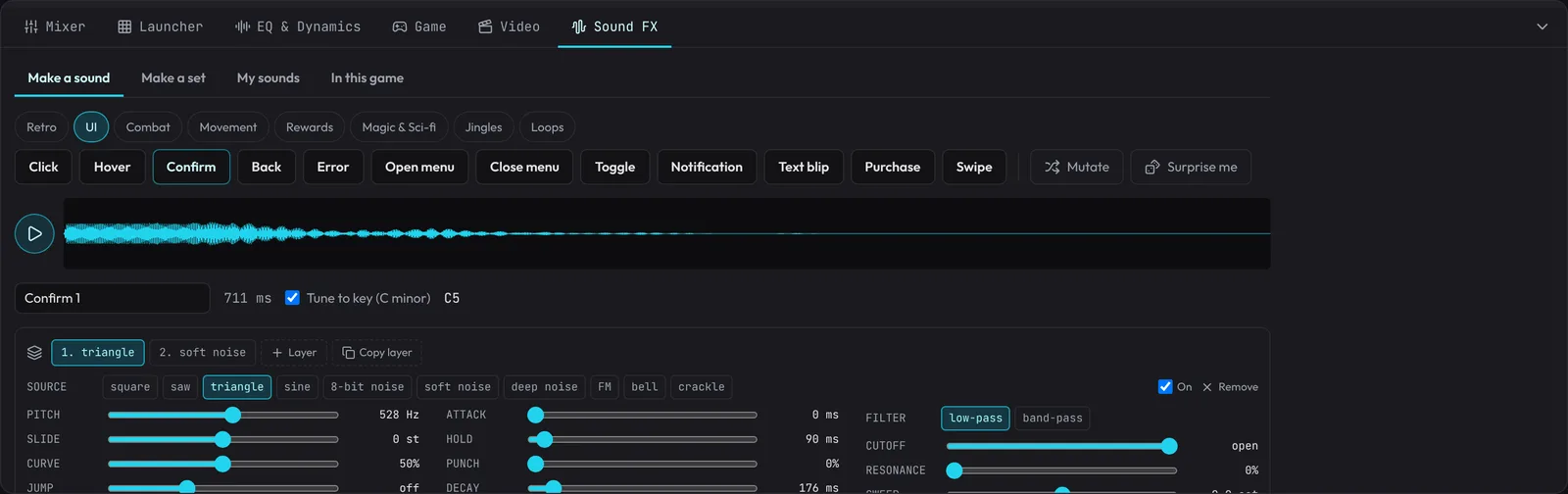
Make a sound. Pick a group (Retro, UI, Combat, Movement, Rewards, Magic & Sci-fi, Jingles, Foley, Loops, Nature, Places, Creatures), then a kind of sound: Click, Confirm, Error, Sword swing, Heavy impact, Footstep, Gem, Level up, Teleport, Victory, Rain, Forest, Thunder, Wolf and about a hundred more. Each click makes a new one of that kind and plays it. Mutate makes one like it but a little different; Surprise me any kind.
- Engine. Every kind except Retro is made with the modern engine: clean waves (no gritty fold-back on high notes), natural decays, stereo, and two things that make a sound real. Recordings: a layer's Source can be a recording of the real thing (footsteps on stone, grass, snow, wood, carpet and dirt; wood, metal, glass and stone hits; punches, cloth, blades, latches, coins, doors, pages, cards, dice, UI clicks, splashes, bubbles, lasers, explosions, rain, water, fire, engines), each with several takes, so every variation of a sound plays a different one; they load when a sound first needs them (17 MB for all of them, mostly the 20-second nature loops; each group loads on its own). Body: a layer can strike something of wood, metal, glass, stone, plastic or skin, which rings at the layer's pitch the way that material does (Ring: how long; Body mix: how much you hear). Each layer can sit anywhere left to right and move across (Pan, Pan to: a sound passing by) spread its noise wide (Width), and swell and drop at random as wind does (Gusts, with Gust speed; Wobble then moves the filter with the gusts, so a whistle rises as the wind blows harder); echo bounces side to side and the reverb has the early reflections of a real room. Modern sounds save as 24-bit stereo WAV. Retro sounds, and any sound made before the modern engine, keep the classic engine (mono, 8-bit character) and sound exactly as they did; Engine in Finish switches a sound between the two. Nature and Places are real field recordings looped for 20 seconds (a different stretch each variation): Forest birdsong, Night insects, Wind in trees, River, Ocean waves, Downpour, Thunderstorm, Cave drips, a City street, a Cafe and a Market, plus single Thunder claps rolling away. Creatures are recorded animals, each a little higher or lower every time so a flock doesn't sound like one bird: songbirds, crows, owls, seagulls, dogs, cats (and a purring loop), wolves, frogs, horses, cows, roosters, chickens, sheep, pigs, bees and flies, and for games a Monster roar, a Zombie, a Goblin and a Squeak. Make a set has them as Nature & places and Animals & creatures. The Foley group is everyday things being handled: doors opening and closing, a page, a book, a card dealt, dice, glass breaking, a bubble, slime and a sci-fi door; Make a set has them as Foley & props. The recordings are public domain (CC0): see the Credits.
- Layers. A sound is up to six layers played together: a modern hit is a thump, a crack and a tail; a sword swing a whoosh and a ring. Each layer has its Source (square, saw, triangle, sine, 8-bit noise, soft noise, deep noise, FM, bell or crackle), its pitch (Pitch, Slide and its Curve, a Jump partway through, Notes to play in turn such as 0 4 7 12 for an arpeggio, Vibrato, Repeat for a warble), its loudness over time (Attack, Hold, Punch, Decay, Tremolo), a filter (low-pass or band-pass, Cutoff, Resonance, Sweep, Wobble, High-pass, Crush), and its Level and Start in the sound. + Layer adds one; Copy layer copies the one you're on; untick On to hear the sound without it. Letting go of any slider plays the result.
- Finish goes over the whole sound: Pitch (every layer), Drive (soft clipping: grit and weight), Echo (with its time and feedback), Reverb and Room, Loudness and Volume, and Loop.
- Even loudness. Every sound is made to a loudness for its kind (soft for menus, normal, loud for impacts and explosions), never above -1 dBFS, with the silence after it trimmed and its ends faded so it never clicks. Sounds you make on different days still sit together in a game.
- Loops (the Loops group, or tick Loop on any sound) render exactly the loop's length and join up seamlessly: engines, wind (a Breeze, Gusty wind, a Storm and Howling wind), rain, fire, a stream, alarms, force fields. Saved as WAV they carry loop points, so Godot, samplers and most engines loop them on their own.
- Tune to key (on when the song has notes) puts pitches, jumps and the notes of jingles in the key the song is in, so a coin or a level-up sits in the music. The key and the first layer's note show next to it.
- Variations. A sound a game plays over and over (a footstep, a hit) sounds mechanical if it's the very same every time. Set Variations (up to 8) and Spread (how far their pitch moves) and Hear variations; saving then makes them all, numbered (footstep_01.wav, footstep_02.wav...), in a zip.
- Save as WAV or OGG (small; Godot and Unity import it), at 44.1 or 48 kHz. File names are ready for a game: lower case with underscores (open_menu.wav). Add to song puts the sound at the playhead on the selected Audio track (or a new one). Keep puts it in My sounds. Add to game puts it in the song's game sounds (below), with its variations: the game kit carries it. Recent brings back the last twelve you made.
Make a set. Every sound a kind of game needs, in one go: Menus & UI (12 sounds), Retro platformer, Action RPG, Sci-fi shooter, Casual & puzzle, Ambience loops, Nature & places, Animals & creatures and Foley & props. The sounds of a set share a style (the same tone, register and space), so they sound like a family, and they're levelled to sit together. Play each one, ↻ for another of it in the set's style, Edit to shape it in Make a sound, ✕ to leave it out, New style to make the whole set again differently, and Hear all. Download set saves a zip with a folder of files named for the game (with variations, if you set them) and a sounds.json that opens the set again in My sounds (Import), to change it later.
In this game lists the song's game sounds: what the game kit export carries next to the music, each named for the game (sword_hit) and played with playSfx("sword_hit") in its players. Play each one, rename it, set its Variations, Edit it (then Update in game puts your changes back) or remove it. Add all to game on a set adds the whole set. They're saved with the song.
My sounds keeps the sounds you Keep in this browser: play, Edit, save or delete them. Export all saves them to a file, to back them up or share them; Import opens one (or a set's sounds.json).
The same settings always make the same sound, so a sound you kept can be made again exactly.
Micro-variations for game sounds
A sound a game plays again and again (a footstep, a sword swing, a menu click) sounds mechanical if it's the very same every time, so games pick one of several slightly different takes at random. Right-click a short clip (a beat or two) and choose Generate variations…:
- Takes: 4, 6 or 8. The first is the clip as it is; the others are drawn within the bounds below, spread across them so no two come out nearly the same. Reroll draws new ones.
- Pitch (± %, 5% is about a semitone either way; a higher take is a little shorter, as on a sampler, so it works on drums and recordings too), Brightness (± %: the track's Filter cutoff, or a gentle low-pass if the Filter is off), Length (± ms: how long each note is held before it lets go) and Level (± %).
- Keep the reverb and echo: off by default, since game sounds are usually dry and the game adds its own space.
- The numbered buttons play each take. Save .zip saves them as
<clip>_01.wavto_08.wav(one shared level, the loudest at -1 dBFS, with the silence at the end trimmed); Lay out on the timeline puts them end to end on a new Audio track right after the clip.
The game kit: everything for the game in one file
Export game kit (.zip) in the Game tab makes everything a game needs to play your music, and your sound effects, the way the panel does. Choose what it's For first:
- Godot 4 project: unzip it into your Godot project's folder (the one with
project.godot). You getbos_music/, with the song's folder, the player, an example scene (bos_music/<song>_example.tscn: open it and press F6, then 1, 2... switch states, Up / Down intensity, Space a stinger, A, B... the sound effects) and a README with the steps to use it in your game: addAdaptiveMusic.gdas an autoload called Music,Music.load_song("res://bos_music/<song>/")once, thenMusic.play(...),Music.set_state(...)and so on. - Unity project: unzip it into your Unity project's folder (the one with
Assets). Everything lands inAssets/Fledgetone: the player, the song underResources/BosMusic/<Song>, an example component (make an empty GameObject, Add Component › Adaptive Music Example, press Play: buttons for every state, stinger and sound effect, and an intensity slider) and a README. - Any engine: one folder with everything and the players for the web, Godot and Unity side by side, as below.
What's inside:
states/: every state (section between markers) as a seamless loop, a whole number of bars long, with loop points.stems/<state>/: when tracks have stem groups, the same loop split by group (tracks without a group go in Main), every stem exactly the same length: played together at full level they make the mix.transitions/: the fill, riser and impact sounds your rules use (a fill or a riser starts just before the switch; an impact on it) and the bridges (bridge into <state>.wav: it plays on the switch and the state comes in after it), andstingers/: every stinger.sfx/: the song's sound effects (added with Add to game in the Sound FX tab), each with its variations (sword_hit_01.wav,sword_hit_02.wav...). Looping ones (an engine, the rain) carry loop points.audio_manifest.json: the tempo, the time signature, the sample rate, the key, every state (its loop, its stems, its length in bars, seconds and samples, and where its bar lines and beats are when the tempo or time signature changes inside it, which the players switch on), the transition rules by state name, every stinger (with how many bars it bridges), each stem group's intensity curve ([intensity, level] points, both 0 to 1) as the recommended gain curve for the game's audio code, and every sound effect with its files.- Ready-made players that read the manifest and do all of it (switching by your rules on the beat, crossfades, stinger bridges, intensity, sound effects):
adaptive-music.jsfor a web game,AdaptiveMusic.gdfor Godot 4, andAdaptiveMusic.csfor Unity (scheduled on Unity's audio clock, so changes land exactly on the beat). Each hasplay,setState/set_state/SetState,setIntensity/set_intensity/SetIntensity,stinger,playSfx/play_sfx/PlaySfx(a different variation each time, never the same one twice in a row; a looping sound plays until stopped),stopSfx/stop_sfx/StopSfx, andstop. Sound effects have their own volume (setSfxVolume,sfxVolume, or Godot'ssfx_bus). - A README that says how to drop it in, with your own state, stinger and sound names in the examples.
FMOD and Wwise
File › FMOD / Wwise package… (also in the Game tab) lays your game music out for audio middleware, in one .zip:
Audio/: every state as an exact loop, its stems by stem group, the stingers and the transition sounds (48 kHz, or 44.1).cues.json: the tempo, every state (bars, seconds, samples, stems, and where it sits on one timeline), the transition rules, the stingers and the intensity curves.fmod/…js: an FMOD Studio script. Put it in your project's Scripts folder and choose Scripts › Fledgetone › Import: it builds the event with a track per stem group, every state laid out with a loop region and a marker, the tempo, an Intensity parameter driving each group's volume along its curve, and an event per stinger.wwise/…py: a Wwise script (Wwise Authoring API, Python). With Wwise open, it builds a Music Switch Container with a playlist and segment per state and a track per stem group, a State Group with a state per section, an Intensity game parameter, and the stingers as sounds.README.md: how to run them, your states, transitions and intensity curves (in dB), and the steps each tool doesn't let a script do (FMOD's transition regions, Wwise's state assignments and RTPC curves).
Versions of FMOD and Wwise differ, so each script step reports whether it worked (OK or SKIP) rather than stopping the rest.
The web runtime kit: music with no audio files
For a web game where download size matters, Export web runtime kit (no audio files) (in the Game tab) makes a .zip with just:
- the song's project file (
<song>.json, usually tens of kilobytes, with any sounds your clips play inside it), bos-player.js(about 1.1 MB, about 290 KB as a web server sends it), which synthesizes the music in the player's browser when the game loads, with the same engine as Fledgetone: every state (as stems, if the song has stem groups), the stingers and the transitions,- a test page (
index.html) and a README.
In the game: const music = await loadSong('./song.json', { onProgress }), then music.play(...), music.setState(...), music.setIntensity(...) and music.stinger(...), exactly as with the game kit's web player. Synthesizing takes a few seconds per minute of music (longer on slow devices; a 16-bar song with three stem groups took about 12 seconds in testing), so start it while the game loads and show a progress bar. Recorded instruments download their samples from the same public libraries the app uses, so they need a connection; the synths need nothing. The plugins the song plays (Fledge Synth and the rest) go in the kit too, in fledgetone-plugins/ beside bos-player.js, so the game doesn't need fledgetone.com for them; if one can't be loaded, loadSong says which instead of leaving its part silent.
GPL-licensed plugins (Surge XT, Dragonfly, Plateau, the Tonewheel Organ): before the kit takes one along, a small window names it, says what the GPL asks (you may ship it in any game, paid or free, but if you share the game its source must be available and its licence must go with it), who made it, with links to its project, its source and where to contact its makers, and offers Export with it or Cancel. With it, the kit also has GPL-PLUGINS-NOTICE.txt (each plugin, its makers and the link to its source) and GPL-PLUGINS-LICENSE.txt (their licences): keep both with your game. A Surge XT patch the song starts on goes in with it.