Guide Scoring to a video
Scoring to a video
Write music to a gameplay clip, a trailer or a cutscene, and see the picture while you work.
- Click Video in the Video tab of the bottom panel (or Video › Load reference video…, or drop a video file anywhere on the page) to load an MP4 or WebM. It appears as a video lane under the ruler, with its frames along the song at the current tempo, and in a preview window that follows the playhead: it plays along when you play, and shows the frame under the playhead when you click or drag on the ruler, so you can line hits up with the picture.
- Drag the video lane sideways to move where the video starts in the song. It snaps to beats; hold Shift to place it freely. The lane's header shows where it starts (time and bar).
- Find the cuts: the scissors on the video lane's header looks through the video for hard cuts and drops a hit point (a marker locked to time) on each one, named Cut 1, Cut 2..., at the frame where the new shot starts. It takes a second or two for a short clip (the header shows how far it's got; click it again to stop). Cuts already marked aren't added twice. Then FIT › Hit points finds a tempo that lands the music on them. Move the video first: the markers go where the cuts fall in the song now.
- Dip under dialogue: the speech bubble on the video lane's header listens to the video's own sound for voices and shows how much talking it found. Pick how far the music should dip (-3 to -24 dB, -10 to start) and click Dip the music: every track's volume dips from a moment before each line until half a second after it, with short pauses between words bridged so the music doesn't bob up mid-sentence. It's written as volume automation (one Undo step), so you can see each dip on the tracks, move or reshape it, and it's in every export. A track that already has a volume lane keeps its shape, lowered in the dips; remember a volume lane takes over from the track's fader. It listens for anything loud in the voice range, so loud effects or music in the video can count too: check the dips and delete any you don't want. A video with no sound the browser can read says so ("Couldn't listen to the video") instead.
- The preview window: drag its top bar to move it, the arrows button cycles its size (small, medium, large), the speaker button lets you hear the video's own sound while you work (off by default), and × hides it. The eye button on the video lane shows it again; × on the lane removes the video.
- To export the music on your video, choose Video (MP4) in Export. With a video loaded, Put the music on your video is ticked: the picture is your video, where it sits on the timeline (black before and after), instead of the visualizer. Tick Keep the video's own sound too to mix its sound effects and dialogue under the music.
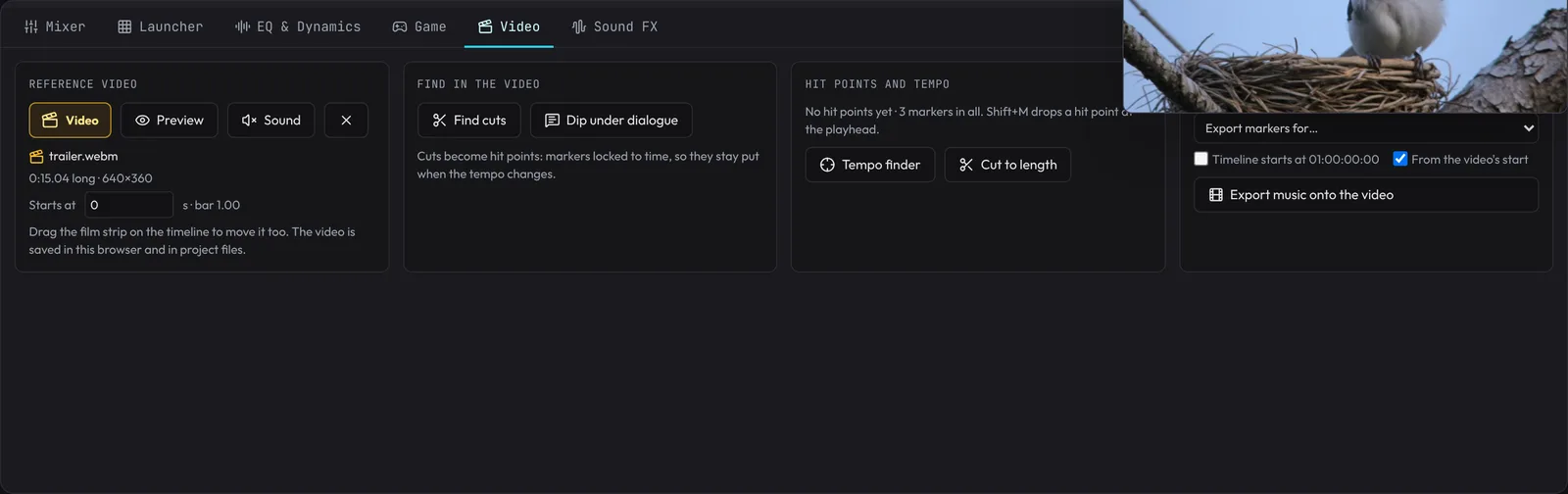
- The Video tab of the bottom panel has it all in one place: load or remove the video, its preview and sound, where it starts (type a time), Find cuts and Dip under dialogue, the hit points and the Tempo finder, Cut to length, the markers for Premiere / Resolve / Final Cut, and exporting the music onto the video.
- The video is saved with the project. It's kept in this browser, so a reload (or Restore of a replaced song) brings it back, where it was. A saved project file carries the video inside it when it's 40 MB or less; a bigger one stays in this browser, and opening the project elsewhere says which video it scores to (load it again and it goes back to its place).